POLYTRACK, MEASURED
R to respawn, T to restart: the two key pairs, quoted
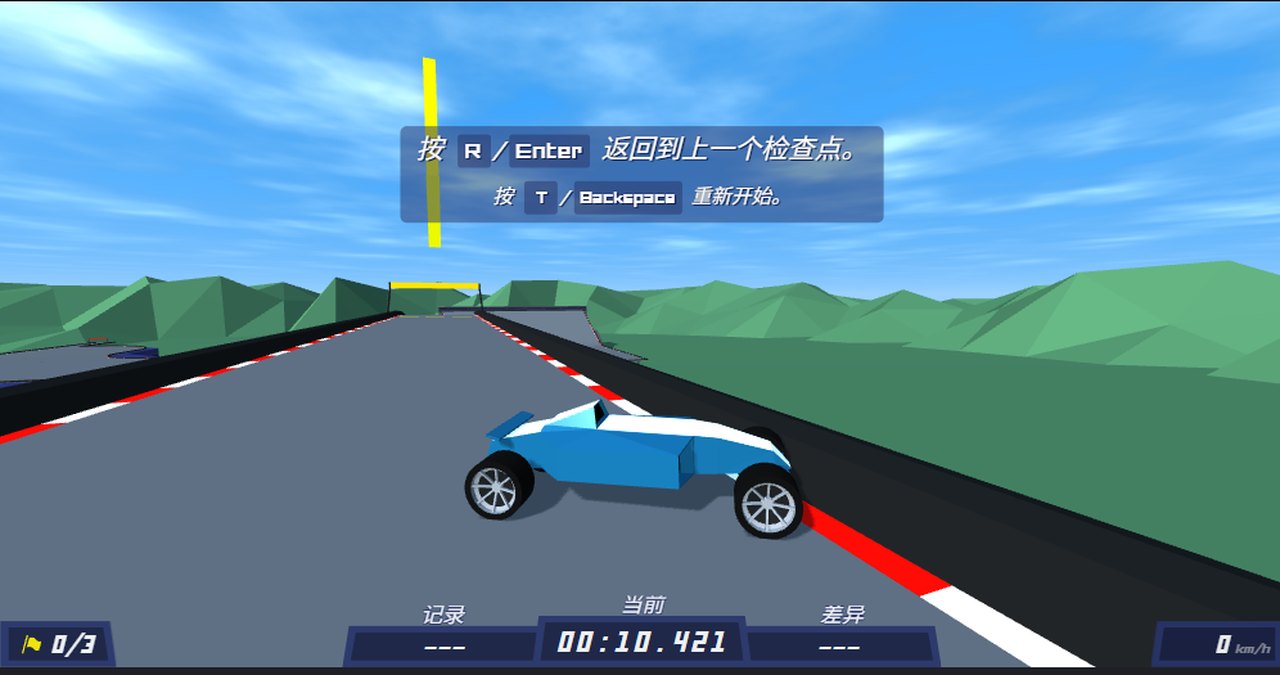
Two key pairs look like the same idea until the client explains them: one sends you back to the last checkpoint, the other restarts the run. The clock keeps running through both.
The two pairs, quoted
When the car came to a stop the panel changed to:
按 R / Enter 返回到上一个检查点。
按 T / Backspace 重新开始。
In English: Press R / Enter to return to the last checkpoint. Press T / Backspace to restart. The store page lists the keys but not what they do, which is why this page exists.
What the clock did
| Moment | Clock | Speed | Mark |
|---|---|---|---|
| Approaching the first gate | 00:04.038 | 28 km/h | TESTED |
| Car stopped, key panel showing | 00:10.421 | 0 km/h | TESTED |
Stopping does not pause the run. The clock is still held at the value it reached, so a stop costs time in the same way a bad corner does — there is no idle state to sit in while you think.
IN-GAME
That is a measurement of what the panel did, not of the lap: we did not finish this run, so no clean time was recorded and none is claimed here.
The other buttons on the same screen
| Button (client label) | What it appears to do | Mark |
|---|---|---|
| 退出 — exit | Leaves the race | TESTED (label only) |
| 观看 — watch | Appears to start a replay or spectator view | NEEDS CHECK |
| 下一软道 — next track | Loads the next circuit | NEEDS CHECK |
The three sit in the top-left corner of the canvas and are drawn by the client, not by the store wrapper.
Unknowns
Whether R / Enter costs a time penalty beyond the clock already running, whether a respawn keeps the checkpoints you had collected, and what watch actually opens are all open questions. They stay listed as NEEDS CHECK rather than guessed at.
For the checkpoint counter itself, see the checkpoint page.
Last checked against the client: 2026-11-02